Dizzy v5.4.7 is live: better live streaming, stronger OBS support, and reliable scheduling
Dizzy v5.4.7 improves the live player, OBS and LiveKit workflows, audio reliability, responsive viewing, scheduled content, and dark mode while keeping the v5.4.6 upgrade path safe and predictable.
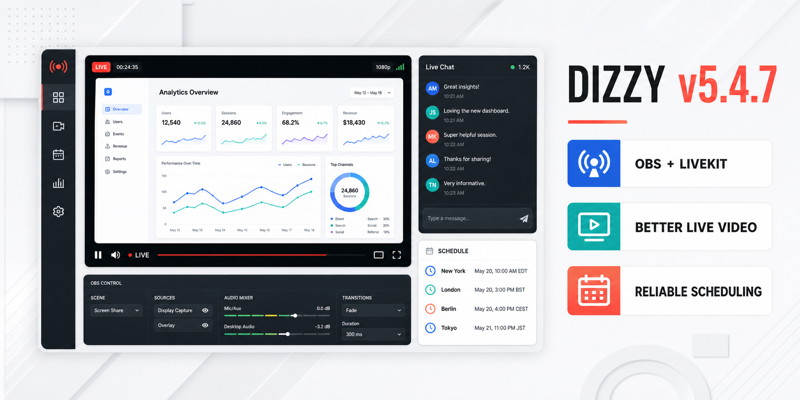
Dizzy v5.4.7 is now available from Envato Downloads, with a focused set of improvements for the part of a creator platform that has the least room for friction: live streaming. This release improves how creators publish through OBS and LiveKit, how viewers see the broadcast on different screens, and how scheduled content keeps the exact time selected by the user.
The work behind v5.4.7 came directly from production feedback. Customers reported cropped camera previews, screen shares that did not fit the player, duplicate audio, rough mobile layouts, unreliable timezone labels, and dark mode widgets that escaped their containers. We treated those reports as one connected experience instead of a list of isolated fixes.
A live player that respects the content
A good live player should keep attention on the broadcast, not on its own limitations. Camera video and OBS screen shares are different sources, but both need predictable presentation. The v5.4.7 player now uses a stable responsive stage and contain-fit media handling, so faces, presentation slides, browser windows, and full-screen shares remain visible without unwanted cropping or stretching.
The live page also has a clearer theater layout. On desktop, the player and chat have more deliberate roles. On mobile, the core viewing and messaging controls remain reachable without horizontal overflow or an oversized decorative background. The creator's OBS control room now sits outside the video stage, keeping operational controls separate from what viewers are watching.
OBS and LiveKit are easier to operate
Dizzy v5.4.7 adds the database and runtime support required for LiveKit and OBS RTMP ingest, including stream server details, stream keys, ingress status tracking, and creator control-room actions. OBS Browser Source overlays also use synchronized runtime, preview, and minified assets for more dependable creator previews and public overlay URLs.
Audio handling received the same attention. LiveKit now reuses the existing remote audio element instead of attaching duplicates after browser audio-unlock events. In the OBS control room, the broadcaster's incoming stream starts muted to prevent common desktop-audio recapture loops, while regular viewers continue to receive normal playback.
Live engagement feels part of the broadcast
Polls, Q&A, the mobile chat composer, the emoji picker, and product offers were refined as one engagement surface. Poll and Q&A controls are cleaner and easier to scan, the mobile message field no longer carries an unnecessary border or background, and the emoji picker now handles successful and failed requests correctly.
Product offer controls are shown only when the broadcaster has an active product or an offer is already pinned. This removes a dead-end action for creators who are not using marketplace products in that broadcast.
Scheduled content keeps the time the user chose
Timezone errors are especially damaging because they often appear only after a page reload or for users in another country. v5.4.7 keeps one saved timestamp through creation, storage, reload, listings, profile cards, countdowns, and publishing. The interface displays that moment in the viewer's active browser timezone instead of exposing an unrelated server or profile timezone.
Scheduled live streams also cannot be started before their saved start time. That restriction is enforced in both the browser and the backend, so the schedule remains trustworthy even when a request is sent outside the normal interface.
Dark mode, mobile layouts, and frontend assets stay aligned
The Top Creators podium in the dark mode right sidebar now keeps avatars, verification badges, medals, and labels inside the widget at controlled sizes. Age confirmation, cookie notices, and landing consent panels also remain inside mobile and tablet viewports.
Normal, compiled, night mode, and minified CSS and JavaScript files were synchronized for this release. Updated cache keys help browsers and service workers load the intended v5.4.7 behavior instead of holding on to an older live streaming asset.
A tested update path for existing sites
We tested both a clean v5.4.7 installation and the official v5.4.6 to v5.4.7 upgrade path. Existing user data, scheduled content, site settings, uploads, and installation-specific connection files remained intact. The update SQL can also be applied again safely when the database structure is already up to date.
Your current installation must already be running Dizzy v5.4.6 before you apply this package. If your site is on an older version, install the previous updates in order first.
Before you update
Back up your website files and database, read the included v5.4.7 update guide, import the provided update SQL, upload the updated files, and clear any browser, service worker, CDN, or server cache that may still serve older assets.
After updating, test one live session as the broadcaster and a second session as a viewer. Check camera framing, an OBS screen share, audio playback, chat and emoji controls, Poll and Q&A, mobile layout, dark mode, and one scheduled post or scheduled live stream in the browser timezone you actually use.
Dizzy v5.4.7 is a focused release, but its impact is broad: creators get a calmer control room, viewers get a more predictable player, and site owners get fewer live-streaming and scheduling edge cases to diagnose.
Download Dizzy v5.4.7 from your Envato Downloads page, then review every documented change in the official Dizzy changelog. If you need help with the update, open a support ticket and include your current Dizzy version, PHP version, browser name, and a clear screenshot or screen recording.
Was this update useful?
Use this area to save the article, share it with your team, or leave focused feedback.
Comments
Super fantastic
Dizzy is topnotch beating all competitors such as sngine, wowonder, name them....